SDB:Network UPS Tools




简介
UPS 控制概念
当输入电源失败时,停止服务器有两种基本策略
- 乐观: 尽可能长时间地使用可用电池电量继续运行。 当电池电量低时,必须关闭服务器。 当输入电源恢复时,启动服务器,并希望输入电源能够可用足够长的时间,至少可以部分地充电。
- 悲观: 在输入电源故障期间,必须尽快关闭服务器。 当输入电源恢复时,启动服务器,但保持待机状态,以便在输入电源再次故障时尽快再次关闭。 如果电源供应质量差(输入电源频繁中断),则首选此策略,因为它允许您节省足够的电池电量以正确关闭服务器。
选择合适的策略取决于市电的质量和您的 UPS 的功能。
NUT 架构

NUT 有 3 个级别,包括以下组件
驱动程序
- 提供与硬件的接口。 请参阅/usr/share/nut/driver.list
服务器
- UPS 信息服务器 upsd,是驱动程序和客户端组件之间的中介(man upsd).
客户端
- 监视器 — UPS 监视器和关机控制器(man upsmon)
- 工具 — upsc、upscmd、upsrw。
- CGI 程序 — 用于 Web 管理的脚本:upsset.cgi、upsstats.cgi、upsimage.cgi(作为单独的软件包安装)。
使用和自定义组件取决于将 UPS 连接到受保护的设备,请参阅 监控图
“简单”配置
一个 UPS 保护一台计算机。 它使用了所有三个级别的组件 - 驱动程序、upsd 服务和 upsmon。
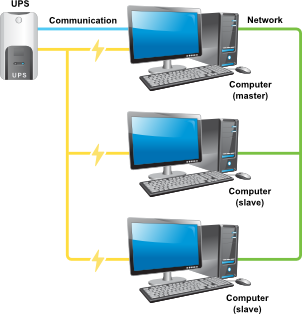
“高级”配置
一个 UPS 为多台计算机提供保护。
主控 — 连接到 UPS 通信的控制计算机,为所有从机计算机提供有关其状况的信息。 设置与“简单”配置系统类似,只是网络设置访问 upsd 服务。
从机 — 受管理的计算机从“主控”系统上的 upsd 服务接收有关 UPS 状态的信息。 它仅使用了第三级组件 upsmon。
检查 UPS 支持

要检查您的 UPS 在 NUT 中的支持以及它需要的驱动程序,可以使用官方 硬件兼容性列表。
安装
项目 Network UPS Tools (NUT) 的软件已获得 GPL 版本 2 的许可。 在 openSUSE 12.3 中使用的版本为 2.6.5,以 RPM 软件包的形式分发。
使用 YaST
根据“YaST 软件管理”的建议,找到并选择软件包 nut,应用更改以安装它。
使用命令行
关于 NUT 软件包的信息
Loading repository data...
Reading installed packages...


Information for package nut:
----------------------------
Repository: openSUSE-12.3-1.7
Name: nut
Version: 2.6.5-4.1.1
Arch: x86_64
Vendor: openSUSE
Installed: Yes
Status: up-to-date
Installed Size: 4.0 MiB
Summary: Network UPS Tools Core (Unbreakable Power Supply Monitoring)
Description:
Core package of Network UPS Tools.
Network UPS Tools is a collection of programs which provide a common
interface for monitoring and administering UPS hardware.
Detailed information about supported hardware can be found in
/usr/share/doc/packages/nut.
配置
设置设备 (ups)
作为示例,考虑为通过 USB 连接的两个 EATON UPS 进行设置。 但是,nut 还支持通过 COM 端口或网络(SNMP)连接的 UPS。
将 UPS 连接到计算机,并在 USB 设备列表中找到它。
...
Bus 003 Device 005: ID 0592:0002 Powerware Corp. UPS (X-Slot)
...
选择合适的驱动程序,它可能取决于通信连接的类型
地点powerware— UPS 制造商,5110— 型号。
"Powerware" "ups" "5" "PW5110" "" "bcmxcp_usb"
/etc/ups/ups.conf
指定将提供保护的 UPS 的名称。 此外,指定所需的驱动程序及其设置。
对于 "EATON Powerware 5110 UPS" (更多详细信息请参见 man bcmxcp_usb)
[PW5110]
        driver = bcmxcp_usb
        port = auto
        desc = "UPS:EATON Powerware 5110 USB"
        shutdown_delay = 90
- shutdown_delay = 90— UPS 在接收到关机命令和实际关机之间等待的秒数。 默认值为 120 秒。
对于 "EATON Ellipse ECO 1600 FR CSS"(更多详细信息请参见 man usbhid-ups)
[Eaton-66781]
        driver = usbhid-ups
        port = auto
        desc = "UPS:EATON Ellipse ASR 1500 USB"
        vendorid = 0463
        offdelay = 30
        ondelay = 40
- offdelay = n— 其中 n 秒是在发送断电命令之后,在 UPS 关闭之前的时间。 默认值为 20 秒。
- ondelay = n— 其中 n 秒是在发送断电命令之后,但在实际关闭之前,UPS 重新启动的时间延迟。 这可确保连接到 UPS 的机器在所有情况下,在断电后都会重新启动。 默认值为 30 秒。 请记住,ondelay 必须大于 offdelay。
数据服务器配置 (upsd)
/etc/ups/nut.conf
此文件的主要作用是确定要启动的 NUT 的部分。
独立模式调用本地配置,一台 UPS 保护本地系统。
MODE = standalone
这意味着启动所有三个级别的 NUT(驱动程序、upsd 服务和 upsmon)以及匹配的配置文件。
如果多个,则对于控制系统(驱动程序、upsd 和 upsmon)
MODE = master
对于所有客户端(仅 upsmon)
MODE = slave
/etc/ups/upsd.conf
指定 upsd 守护程序将侦听的端口。 默认情况下,openSUSE 12.3 启用 IPv6,因此指定
# Make sure this matches the IPv6 setting in YaST -> Network Devices ->
# Network Settings -> Global options -> IPv6 Protocol Settings
# LISTEN <address> [<port>]
LISTEN 127.0.0.1 3493
LISTEN ::1 3493
如果您使用 YaST -> 网络设备 -> 网络设置 -> 全局选项 -> IPv6 协议设置禁用 IPv6,则仅指定
LISTEN 127.0.0.1 3493
# IPv6 turned off
在多主机配置中,对于主服务器指定
LISTEN 0.0.0.0 3493
对于从机主机,不使用此配置,因为 upsd 守护程序未运行。
数据服务器安全
版本:openSUSE 11.4 及更早版本 本节中的信息仅适用于 openSUSE 12.1 之前的版本
限制对 upsd 守护程序的访问
ACL localhost 127.0.0.1/32
ACL localnet 192.168.0.0/24
ACL all 0.0.0.0/0
ACCEPT localhost localnet
REJECT all
版本:openSUSE 12.1 及更高版本 在 openSUSE 的较新版本中,NUT 使用 TCP-Wrappers 提供对 upsd 守护程序的受控访问。 要配置,请使用 /etc/hosts.allow
/etc/ups/upsd.users
此文件设置 upsd — UPS 网络守护程序的权限。 在此处定义的用戶,在此处获得密码,并控制其权限。
[upsmaster]
        password = master_sekret
        upsmon master

[upsslave]
        password = slave_sekret
        upsmon slave
您可能需要比 master_sekret 和 slave_sekret 更好的密码。
/etc/hosts.allow
/etc/hosts.deny
此文件未被使用,并且在我的配置中不存在。 所有拒绝都指定在hosts.allow.
NUT-Monitor 配置 (upsmon)
/etc/ups/upsmon.conf
此文件的主要工作是定义 upsmon 将监视的系统,并告诉它在必要时如何关闭系统。 对于独立模式和多主机配置中的主系统
#MONITOR PW5110@localhost 1 upsmaster master_secret master
对于多主机配置中的从机系统
#MONITOR PW5110@upsserver 1 upsslave slave_secret slave
其他选项默认情况下
MINSUPPLIES 1
SHUTDOWNCMD "/sbin/shutdown -h +0"
POLLFREQ 5
POLLFREQALERT 5
HOSTSYNC 15
DEADTIME 15
POWERDOWNFLAG /etc/killpower
RBWARNTIME 43200
NOCOMMWARNTIME 300
FINALDELAY 5
NOTIFYFLAG ONLINE   SYSLOG+WALL
NOTIFYFLAG COMMOK   SYSLOG+WALL
NOTIFYFLAG SHUTDOWN SYSLOG+WALL
NOTIFYFLAG ONBATT   SYSLOG+WALL
NOTIFYFLAG LOWBATT  SYSLOG+WALL
NOTIFYFLAG FSD      SYSLOG+WALL
NOTIFYFLAG NOCOMM   SYSLOG+WALL
NOTIFYFLAG COMMBAD  SYSLOG+WALL
悲观策略脚本
/etc/ups/upssched.conf
/usr/sbin/upssched-cmd
如何关闭 UPS 设备
版本:12.2 及更高版本 OpenSUSE 12.2 和 12.3 已完全采用 systemd 和 systemctl。 这可能是 12.2 中出现的电源故障关机管理中的一个错误的原因。 此处描述的修复仅适用于 openSUSE 12.2 和 12.3 版本。 它不适用于早期版本。
竞赛
发送到 UPS 设备的延迟关机顺序不是立即顺序。 如果是这样,UPS 将立即关闭,导致数据丢失。 使用的顺序是“延迟关机”,默认延迟为 20 秒。 这通常足以允许服务器在 UPS 之前关闭,但不能保证。 UPS 和服务器争分夺秒地关闭。 我们希望服务器获胜。 简单的 ASCII 艺术显示了基本测试平台的时序和 脚本关机。
 systemctl               system
 poweroff                 halt
     |                 |XXXX|
     0   2   4   6   8 |10  12  14  16  18  20  22  24  26  28  30  32 secs
                       |                                       |
                   upsdrvctl                                  UPS
                   shutdown                                 shutdown
更多的 ASCII 艺术显示了相同测试平台的时序和 服务单元关机
 systemctl               system
 poweroff                 halt
     |     |XXXXXXXXXXXXXXXX|
     0   2 | 4   6   8  10  12  14  16  18  20  22  24  26  28  30  32 secs
           |                                       |
        upsdrvctl                                 UPS
        shutdown                                shutdown
脚本解决方案的优点是减少了竞赛窗口,从 9 秒到 3 秒。 请注意,通过将 offdelay = 26 设置在/etc/ups/ups.conf.
中,也可以实现相同的安全性。 您应该选择这两个解决方案中的一个 - 而不是两者。
使用 bash 脚本
systemd 为在系统关闭期间尽可能晚执行的脚本提供了 drop-in 目录。/usr/lib/systemd/system-shutdown是用户脚本的目录,而/lib/systemd/system-shutdown是系统脚本的目录。 尽管关闭 UPS 设备显然是一项系统问题,而不是用户问题,但我使用/usr/lib/...目录,因为我的脚本不是官方分发产品的一部分。
systemd 会自动检测到 drop-in 目录中的脚本需要执行。 无需启用脚本。
将以下脚本 ups-delayed.shutdown 放置在/usr/lib/systemd/system-shutdown.
版本:openSUSE 12.2 及更高版本 从 12.2 版本开始,不再存在 /usr/lib...,因此您需要选择 /lib/...
#! /bin/bash
# ups-delayed.shutdown  Delayed turn off for the UPS unit.
# Needed for automatic system restart when wall power returns.
UPSDRVCTL_BIN=/usr/lib/ups/driver/upsdrvctl
$UPSDRVCTL_BIN shutdown
要测试关机,请使用命令
控制台或/var/log/messages中没有脚本执行记录。您需要检查 UPS 是否真的关机。
使用 systemd 服务单元
创建一个 systemd 服务单元来关机 UPS。该单元是新文件/etc/systemd/system/ups-delayed-shutdown.service
# ups-delayed-shutdown.service

# OpenSUSE 12.3 powerdown: server shutdown requires UPS shutdown
# This service fixes a problem with openSUSE 12.3 NUT.
# Background: When wall power fails the system and the UPS must
# be shut down in such a way that when wall power returns,
# the server is turned back on again without human intervention.

# For this process to work, the UPS unit must receive a
# delayed-UPS-shutdown signal which will put it into a state where
# it will restart the server when wall power returns. A UPS unit
# which is simply left beeping will not restart its load when wall
# power returns.

[Unit]
Description=Initiate delayed UPS shutdown
Before=umount.target
DefaultDependencies=no

[Service]
Type=oneshot
ExecStart=/usr/lib/ups/driver/upsdrvctl shutdown

[Install]
WantedBy=final.target
必须启用此服务。使用命令
ln -s '/etc/systemd/system/ups-delayed-shutdown.service' '/etc/systemd/system/final.target.wants/ups-delayed-shutdown.service'
要测试关机,请使用命令
应该在/var/log/messages
2013-08-11T13:20:20.557069+02:00 pinta systemd[1]: Starting Initiate delayed UPS shutdown...
中写入类似如下的行,您应该看到主电源关闭,几秒钟后 UPS 关机。10 秒后,由于市电仍然存在,服务器应该自动重启。
调试和故障排除
UPS 连接问题
对于 USB 连接的诊断,需要测试子系统 UDEV。
检查 UDEV 规则
ATTR{idVendor}=="0592", ATTR{idProduct}=="0002", MODE="664", GROUP="daemon"
ATTR{idVendor}=="0592", ATTR{idProduct}=="0004", MODE="664", GROUP="daemon"
UDEV 监视器允许分析连接和断开 UPS 时发生的事件
monitor will print the received events for:
UDEV - the event which udev sends out after rule processing
KERNEL - the kernel uevent
断开 UPS 的电缆
KERNEL[1766.454306] remove   /devices/pci0000:00/0000:00:1d.1/usb3/3-2/3-2:1.0 (usb)
KERNEL[1766.455629] remove   /devices/pci0000:00/0000:00:1d.1/usb3/3-2 (usb)
UDEV  [1766.456081] remove   /devices/pci0000:00/0000:00:1d.1/usb3/3-2/3-2:1.0 (usb)
UDEV  [1766.457179] remove   /devices/pci0000:00/0000:00:1d.1/usb3/3-2 (usb)
连接 UPS 的电缆
KERNEL[1770.321286] add      /devices/pci0000:00/0000:00:1d.1/usb3/3-2 (usb)
KERNEL[1770.324196] add      /devices/pci0000:00/0000:00:1d.1/usb3/3-2/3-2:1.0 (usb)
UDEV  [1770.331446] add      /devices/pci0000:00/0000:00:1d.1/usb3/3-2 (usb)
UDEV  [1770.338683] add      /devices/pci0000:00/0000:00:1d.1/usb3/3-2/3-2:1.0 (usb)
此外,分析 Udev 规则处理的问题也可能很有用
测试驱动程序
附录
配置文件
配置文件位于目录/etc/ups/某些运行时文件位于/var/lib/ups/并且有一个有用的脚本位于/usr/sbin/.
NUT 提供的文件
| 权限 | 所有者 组 | 名称 | 目的 | 使用 |
|---|---|---|---|---|
| drwxr-xr-x | root root | /etc/ups/ | 目录 | |
| -rw-r--r-- | root root | /etc/ups/hosts.conf | CGI 程序 | 未使用 |
| -rw-r--r-- | root root | /etc/ups/nut.conf | 通用 | |
| -rw-r--r-- | root root | /etc/ups/ups.conf | 定义 UPS | |
| -rw------- | upsd root | /etc/ups/upsd.conf | 访问控制 | 如果未使用 IPv6,请使用 |
| -rw------- | upsd root | /etc/ups/upsd.users | 网络用户 | |
| -rw------- | upsd root | /etc/ups/upsmon.conf | 监控 | |
| -rw-r--r-- | root root | /etc/ups/upssched.conf | 命令 | |
| -rw-r--r-- | root root | /etc/ups/upsset.conf | Web 访问 | 未使用 |
| drwx------ | upsd 守护进程 | /var/lib/ups/ | 目录 | |
| -rwxr--r-- | upsd 守护进程 | /usr/sbin/upsd | 二进制文件 | |
| -rwxr--r-- | upsd 守护进程 | /usr/sbin/upsmon | 二进制文件 | |
| -rwxr--r-- | upsd 守护进程 | /usr/sbin/upssched | 二进制文件 | |
| -rwxr-xr-x | root root | /bin/upssched-cmd | 示例脚本 | 未使用 |
NUT 的自定义脚本
| 权限 | 所有者 组 | 名称 | 目的 | 使用 |
|---|---|---|---|---|
| -rwxr--r-- | upsd 守护进程 | /usr/sbin/upssched-cmd | 悲观策略脚本 |
NUT 需要的 UPS 关机技术选择
| 权限 | 所有者 组 | 名称 | 目的 | 使用 |
|---|---|---|---|---|
| -rw-r--r-- | root root | /usr/lib/systemd/system-shutdown/ups-delayed.shutdown | UPS 关机脚本 | 选择其中之一 |
| -rw-r--r-- | root root | /etc/systemd/system/ups-delayed-shutdown.service | UPS 关机脚本 | 选择其中之一 |
NUT 使用的 TCP 包装文件
| 权限 | 所有者 组 | 名称 | 目的 | 使用 |
|---|---|---|---|---|
| -rw-r--r-- | root root | /etc/hosts.allow | TCP 包装器访问控制 | |
| -rw-r--r-- | root root | /etc/hosts.deny | TCP 包装器访问控制 | 未使用 |