SDB:Firefox custom search
本文档描述了如何设置 Firefox,使其在搜索栏中使用 Google 的自定义搜索。这使您能够利用 Google 的强大功能在维基内进行搜索。但是,现在也有一个适用于 Firefox 的 openSUSE 维基搜索插件。它的行为与维基的搜索引擎相同。(当页面匹配时,您将直接跳转到该页面)。请参阅下面的外部链接



通用
使用 Google 搜索您的网站很容易。例如,在搜索字段中输入 site:en.opensuse.org wireless,您就可以利用 Google 的强大功能来查找此维基上关于无线技术的文章。不过,还有一种更好的方法。
感谢 Firefox 自定义搜索,您可以跳过每次输入 site:en.opensuse.org。
设置
查看 /usr/lib/firefox/searchplugins,您会看到许多文件
* amazondotcom.xml
* answers.xml
* creativecommons.xml
* eBay.xml
* google-opensuse.xml
* google.xml
* NovellCool.gif
* NovellCool.src
* NovellDocumentation.gif
* NovellDocumentation.src
* NovellSupport.xml
* opensuse-software.xml
* yahoo.xml
每个 <something>.xml 文件对应于从右上角搜索字段中以 Google 开头的搜索引擎之一。
google-opensuse.xml 是新的文件。它是 google.xml 的编辑副本,因此创建自定义搜索不应该有问题。以下是一个示例,其中新创建的搜索将像您在搜索字段中输入 site:en.opensuse.org,然后输入您的搜索词一样。
<SearchPlugin xmlns="http://www.mozilla.org/2006/browser/search/">
<ShortName>openSUSE Wiki</ShortName>
<Description>openSUSE Wiki with Google Search</Description>
<InputEncoding>UTF-8</InputEncoding>
<Image width="16" height="16">data:...
</Image>
<Url type="application/x-suggestions+json" method="GET" template="http://suggestqueries.google.com/comple
te/search?output=firefox&client=firefox&qu={searchTerms}"/>
<Url type="text/html" method="GET" template="http://www.google.com/search">
  <Param name="q" value="site%3Aen.opensuse.org+{searchTerms}"/>
</Url>
<SearchForm>http://www.google.com/</SearchForm>
</SearchPlugin>
该部分中跳过了图像数据
<Image width="16" height="16">data:...
</Image>
因为它是一堆属于图标图像的字节。您可以保留 Google 图标,也可以从 opensuse-software.xml 中合并 openSUSE 图标。
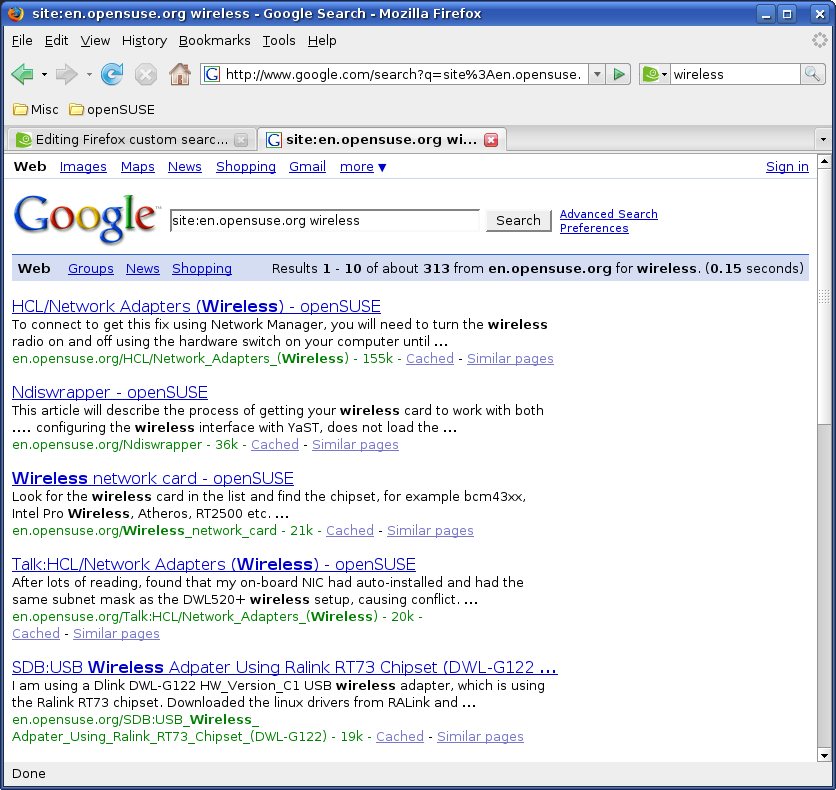
这是最终效果,您可以看到您在右上角输入了 wireless,而 Google 实际上收到了 site:en.opensuse.org wireless 并列出了结果。
返回 Firefox |