openSUSE:WebYaST REST API
REST-API - YaST-webservice 和 YaST-webclient 之间的接口
通用
Yast2-webservice 为相关主机机器的 YaST 环境提供接口。此服务在安装了 Web 服务器(例如 lighthttp)的情况下运行,并提供基于 REST(Representational state transfer)架构的 API。请参阅 http://en.wikipedia.org/wiki/Representational_State_Transfer 以获取有关 REST 的更多信息。
例如,为了获取或设置系统时间,您可以使用 HTTP URL
http://<name_of_the_host>/systemtime
为了确定该值是需要设置还是需要获取,HTTP 协议有四种方法
- GET 获取一个值
- PUT 覆盖一个值
- POST 创建一个新值
- DELETE 删除一个值。例如,删除一个用户帐户
HTTP 请求的通用结构
信息可以以 3 种不同的格式获取/设置
http://<name_of_the_host>/systemtime
以 HTML 格式返回系统时间。
http://<name_of_the_host>/systemtime.xml
以 XML 格式返回系统时间。
http://<name_of_the_host>/systemtime.json
以 JSON 格式返回系统时间。
GET
信息可以以一个块的形式获取,也可以通过额外的 HTTP 调用获取该块的每个条目
GET http://<name_of_the_host>/systemtime.xml
返回
<systemtime>
<currenttime type="datetime">2008-09-10T17:13:37Z</currenttime>
  <is_utc type="boolean">false</is_utc>
  <timezone>Europe/Berlin</timezone>
  <validtimezones type="array">
     <timezone>
        <id>Africa/Abidjan</id>
     </timezone>
     <timezone>
        <id>Africa/Accra</id>
     </timezone>
     ....
     ..
     .
  </validtimezones>
</systemtime>
可以使用以下命令在命令行中生成 GET 调用
curl -0 -X GET -b <cookie_file> http://0.0.0.0:3001/systemtime.xml
"-b <cookie_file>" 描述一个包含文件名“cookie_file”的 cookie。此 cookie 包含当前会话的登录信息。cookie 文件也可以通过 POST 请求生成
POST
Post 请求通常用于创建新条目,例如添加新用户帐户。
它们也用于没有定义请求,不会更改任何数据的情况。示例包括“启动/停止服务”或生成登录会话
POST <hostname>/login
检查 SYSTEM 帐户并使用给定值创建会话
<hash>
  <login>tuxtux</login>
  <password>password_tuxtux</password>
  <remember_me type="boolean">true</remember_me>
</hash>
remember_me:生成一个有效期为 1 天的 cookie。
这将返回
<hash>
  <login>granted</login>
</hash>
或者在出错的情况下
<hash>
  <login>denied</login>
</hash>
如果您使用“curl”进行测试,则需要使用以下命令生成会话 cookie
curl -0 -X POST -v -H "Content-Type: application/xml; charset=utf-8" -T <login_xml_file> -c <cookie_file> http://0.0.0.0:3001/login.xml
此调用将生成一个包含在 <login_xml_file> 中描述的登录数据的 cookie 文件。
PUT
Put 请求用于覆盖现有值。可以一次性覆盖多个值,也可以在额外的 HTTP 调用中显式设置该块的每个条目
PUT http://<name_of_the_host>/languages
使用一个 XML 数据块
<?xml version="1.0" encoding="UTF-8"?>
  <language>
    <first_language>de_DE</first_language>
      <second_languages type="array">
     <language>
        <id>en_US</id>
     </language>
     <language>
        <id>en_GB</id>
     </language>
  </second_languages>
</language>
注意:HTML 和 JSON 格式也是有效格式,用于需要更改的值。
可以使用以下命令在命令行中生成 Put 调用
curl -0 -v -H "Content-Type: application/xml; charset=utf-8" -T <data-file> -b <cookie_file> http://0.0.0.0:3001/languages.xml
("-b <cookie_file>" 描述一个包含文件名“cookie_file”的 cookie。此 cookie 包含当前会话的登录信息。)
DELETE
Delete 请求用于删除条目,例如用户帐户
DELETE http://0.0.0.0:3001/yast/v1/users/tux2
可以使用以下命令在命令行中生成 DELETE 调用
curl -0 -X DELETE -b <cookie_file> http://0.0.0.0:3001/users/tux2
("-b <cookie_file>" 描述一个包含文件名“cookie_file”的 cookie。此 cookie 包含当前会话的登录信息。)
YaST webservice API
YaST API 有两种不同的接口
- 固定接口,存在于每个 YaST-webservice 上。例如,这些是用于会话处理(登录、注销)或检查权限的请求。
- 可变接口,取决于安装在相关 YaST-webservice 上的模块/插件(例如用户、补丁、系统时间)。
固定接口
<hostname>/login
登录并创建会话。如果需要,将生成一个额外的登录 cookie。用户帐户将使用 PAM 进行检查。因此,只能登录 SYSTEM 用户。POST <hostname>/login 检查 SYSTEM 帐户并使用给定值创建会话
<hash>
  <login>tuxtux</login>
  <password>password_tuxtux</password>
  <remember_me type="boolean">true</remember_me>
</hash>
remember_me:生成一个有效期为 1 天的 cookie。
这将返回
<hash>
  <login>granted</login>
</hash>
OR in the error case:
<hash>
  <login>denied</login>
</hash>
如果您使用“curl”进行测试,则需要使用以下命令生成会话 cookie
curl -0 -X POST -v -H "Content-Type: application/xml; charset=utf-8" -T <login_xml_file> -c <cookie_file> http://0.0.0.0:3001/login.xml
此调用将生成一个包含在 <login_xml_file> 中描述的登录数据的 cookie 文件。
<hostname>/logout
销毁当前会话并使相关的 cookie(如果有)失效。
POST <hostname>/logout
这将返回
<hash>
  <logout>Goodbye!</logout>
</hash>
<hostname>/permissions
参数
- user_id - 检查该用户的权限
- filter - 过滤搜索的权限
此调用对于需要检查权限的应用程序非常有用,例如在生成菜单条目或输入框架之前。
GET /permissions?user_id=<user_id>
GET /permissions?user_id=<user_id>&filter=<filter>
返回
<permissions type="array">
  <permission>
    <name>org.opensuse.yast.system.time.read</name>
    <grant type="boolean">true</grant>
  </permission>
  <permission>
    <name>org.opensuse.yast.systemtime.write-timezone</name>
    <grant type="boolean">true</grant>
  </permission>
  <permission>
    <name>org.opensuse.yast.systemtime.read-isutc</name>
    <grant type="boolean">true</grant>
  </permission>
  <permission>
    <name>org.opensuse.yast.systemtime.write</name>
    <grant type="boolean">true</grant>
  </permission>
  ...
  ..
  .
</permissions>
可变接口
YaST-webservice 包含不同的插件。每个插件都设计用于执行特殊任务,例如用户、补丁、系统时间,并且具有自己的 REST-API。
因此,YaST-webservice API 取决于安装了哪些插件(在软件包中定义)。
任何 REST 接口的一个特性是用户可以询问接口 API 的格式。
YaST-webservice 通过以下调用提供此信息
GET <hostname>/resources.xml
返回
<resources type="array">
   <resource>
     <interface>org.opensuse.yast.system.patches</interface>
     <singular type="boolean">false</singular>
     <href>/patches</href>
   </resource>
   <resource>
     <interface>org.opensuse.yast.system.services</interface>
     <singular type="boolean">false</singular>
     <href>/services</href>
   </resource>
   <resource>
     <interface>org.opensuse.yast.system.security</interface>
     <singular type="boolean">true</singular>
     <href>/security</href>
   </resource>
   <resource>
     <interface>org.opensuse.yast.system.time</interface>
     <singular type="boolean">true</singular>
     <href>/time</href>
   </resource>
   <resource>
     <interface>org.opensuse.yast.system.language</interface>
     <singular type="boolean">true</singular>
     <href>/language</href>
   </resource>
   <resource>
     <interface>org.opensuse.yast.system.sambashares</interface>
     <singular type="boolean">false</singular>
     <href>/sambashares</href>
   </resource>
   <resource>
     <interface>org.opensuse.yast.system.users</interface>
     <singular type="boolean">false</singular>
     <href>/users</href>
   </resource>
   <resource>
     <interface>org.opensuse.yast.commandlines</interface>
     <singular type="boolean">false</singular>
     <href>/yast/commandlines</href>
   </resource>
</resources>
安全
通用
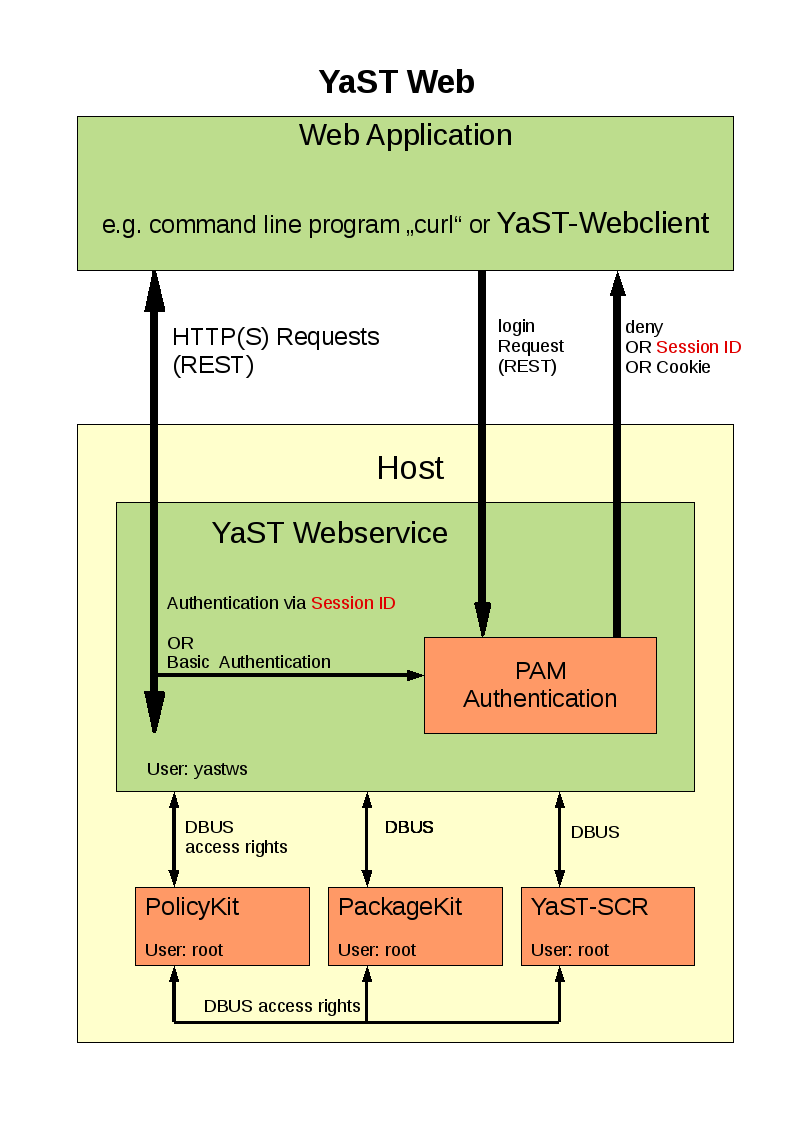
登录
用户(Web 应用程序)通过 Http(s)/REST 将用户/密码发送到 YaST Webservice 进行登录请求。此请求将使用 PAM 进行检查。将授予或拒绝访问权限。如果请求成功完成,将创建一个会话,并(根据要求)将 cookie 发送到 Web 应用程序。
单个任务,例如获取系统时间设置
用户“tux”(Web 应用程序)发送 HTTP(s) 请求
GET http://<name_of_the_host>/yast/<protocol_version>/systemtime.xml
身份验证
YaST Webservice 使用基本身份验证(Digest Auth.)。这意味着用户名和密码包含在 HTTP 标头中。YaST Webservice 具有不同级别的身份验证检查,顺序如下
- HTTP 标头中的“user”和“password”(基本身份验证)将使用 PAM 进行检查。
- 字段“password”包含来自以前登录请求的会话 ID,该 ID 将与当前会话进行比较。
- 如果请求包含带有会话信息的 cookie(可以在登录请求期间生成),则会将此 cookie 与当前会话进行比较。
如果所有这些检查都失败,将向发送者返回 HTTP 错误 401。
请求流程
YaST Webservice 检查“tux”是否具有读取这些设置的权限:policyKit_check (“tux”, “read.systemtime”) 如果已授予权限,YaST Webservice 将启动必要的命令到 SCR - Agent,以获取所有必要的信息:Scr.read(".sysconfig.clock.HWCLOCK") Scr.execute("/bin/date") Scr.read(".sysconfig.clock.TIMEZONE") 这些请求将使用用户帐户“yastws”发送到 SCR - Agent。SCR - Agent 使用 PolicyKit 检查“yastws”是否具有这些调用的权限。
较新的插件版本使用 YaST-DBUS 接口而不是 SCR 调用。这里检查权限的方法仍然相同。
用户权限
每个 WebYaST/YaST Webservice 调用都有相关的访问权限,可以为每个用户定义。还可以为具有特殊权限的角色(例如管理员、秘书、会计)定义角色。可以将这些角色分配给相关用户。
使用 WebYaST-UI 处理权限
处理权限最简单的方法是使用 Roles WebYaST 模块。
在命令行中处理权限
每个 YaST Webservice 调用都有相关的访问权限,可以为每个用户定义。这些权限由 PolicyKit 在以下文件中处理
/usr/share/PolicyKit/policy/org.opensuse.yast.*
如果在 API 使用过程中遇到权限错误,请查看 YaST-webservice 日志文件,以获取缺少哪些权限的信息
Action: org.opensuse.yast.system.users.delete User: schubi Result: no
Action: org.opensuse.yast.system.users.read User: schubi Result: yes
可以使用以下命令设置这些权限
polkit-auth --user schubi --grant org.opensuse.yast.system.users.delete
或者可以重置为
polkit-auth --user schubi --revoke org.opensuse.yast.system.users.read
为了清理或授予所有权限,您可以使用随 yast2-webservice 软件包提供的 ruby 脚本 policyKit-rights.rb
 Usage: policyKit-right.rb --user <user> --action (show|grant|revoke)
NOTE: This program should be run by user root
This call grant/revoke ALL permissions for YaST the Webservice.
In order to grant/revoke single rights use:
polkit-auth --user <user> (--grant|-revoke) <policyname>
In order to show all possible permissions use:
polkit-action
约定
每个 YaST-webservice 插件都在 /usr/share/PolicyKit/policy/ 中提供自己的策略描述文件,并遵循以下约定
- 文件名是插件接口名称,后跟“.policy”后缀。例如,插件“users”具有接口名称“org.opensuse.yast.system.users”(在 config/resources/users.yml 中定义)。因此,/usr/share/PolicyKit/policy/ 中的策略文件名为 org.opensuse.yast.system.users.policy
- “少即是多”。为了避免向管理员提供细粒度的权限,我们应该注意,在大多数情况下,插件的一个读取、写入、删除、新权限就足够了。
- 如果需要更多细粒度的权限,请尝试使用树结构,这意味着字符串中描述的权限由“-”分隔。例如 org.opensuse.yast.language.write-firstlanguage。格式应为“<what to do>-<with which it has to be done>”