openSUSE:Git 打包工作流程
重要提示: 本文档假定您已经阅读了 OBS 到 Git 页面。对于命令行贡献者,请参阅 git-obs 工作流程 部分,以实现简化的软件包管理。要了解已知问题,请参阅 专用页面。
先决条件
OSC 版本要求
确保您正在运行 osc 版本 1.15.0 或更高版本。早期版本可能包含 osc fork 功能中的错误。例如,Issue #1767 或 Issue #1760。
对于 Leap 用户: 添加 openSUSE:Tools 仓库以获取最新的 osc
zypper ar -f obs://openSUSE:Tools tools
在 src.opensuse.org 上设置您的帐户
在运行以下任何命令之前,您需要确保您的帐户已使用 ssh 密钥设置,您可以按照以下步骤生成新的密钥
ssh-keygen -t ed25519 -C "your_email@example.com"
ssh-add ~/.ssh/id_ed25519 # or use a different filename as required
现在导航到 https://src.opensuse.org/user/settings/keys 并单击 `添加密钥`,您可以在 ~/.ssh/ 中找到要添加的密钥,或者运行以下命令
git-obs ssh-key add --key-path ~/.ssh/id_ed25519.pub # your filename may vary
最后配置 git-obs 以登录
# Add your login
git-obs login add opensuse --url https://src.opensuse.org --user [username] --set-as-default
# Use the following command to check that your login has been successful, if it is you will see your username and the url along with other data.
git-obs login list
与旧工作流程的命令比较
软件包源代码在 Git 中维护。确保使用 SSH 克隆并拥有 Gitea 配置文件中的 SSH 密钥才能推送更改。
| 旧命令 | 新命令 | 解释 |
|---|---|---|
osc add file |
git add file |
添加文件 |
osc vc |
osc vc |
变更日志 |
osc ci |
git commit; git push |
推送更改到远程仓库 |
osc build |
osc build |
构建软件包 |
osc branch |
osc fork |
在 gitea 和 OBS 上创建分支和构建设置 |
osc mkpac |
obs-git-init |
创建或更新 git 仓库 |
osc meta prjconf |
vi _config |
编辑项目 git 中的“_config”文件 |
示例更新工作流程
以下示例显示了作为维护者更新软件包的工作流程
### As a maintainer, you may want to work directly in your repository:
git clone gitea@src.opensuse.org:xmpp/libstrophe.git

### If you are not the maintainer, you will not have write permission later on. So you may want
### to fork instead the repository and setup a build project. You can create this with one step:
osc fork network:messaging:xmpp libstrophe
osc co home:username:branches:network:messaging:xmpp/libstrophe # this is actually doing a git clone

cd libstrophe
### Should use main branch for Git devel projects.
git checkout -b main
vi *.spec
git rm *tar.xz
osc service localrun download_files
git add *tar.xz
osc vc
### Note: by default, this builds against openSUSE:Factory and not project
osc build --alternative-project=network:messaging:xmpp
git checkout main
git add *.spec *.changes *.tar.xz
git commit -m "Update to version ABC"
git push
osc results network:messaging:xmpp/libstrophe
osc sr network:messaging:xmpp/libstrophe openSUSE:Factory
运行 osc fork 将打印有用的输出
osc fork network:messaging:xmpp libstrophe
Using the following Gitea settings:
 * Config path: /home/username/.config/tea/config.yml
 * Login (name of the entry in the config file): obs
 * URL: https://src.opensuse.org
 * User: user1

Forking git repo xmpp/libstrophe ...
 * Fork created: user1/libstrophe

Forking OBS package network:messaging:xmpp/libstrophe ...
 * OBS apiurl: https://api.opensuse.org
 * Fork created: home:user1:branches:network:messaging:xmpp/libstrophe
 * scmsync URL: https://src.opensuse.org/user1/libstrophe#main
我们可以看到,它实际上在 Gitea 上创建了一个分支,并在 OBS 上创建了一个项目分支,以便您可以测试构建。
作为维护者,我们也可以
git clone https://src.opensuse.org/xmpp/libstrophe.git
cd libstrophe # and do the changes as above
osc sr network:messaging:xmpp/libstrophe openSUSE:Factory # and still submit by mentioning the OBS project
我们也可以使用 tea 或 git-obs 仅在 Gitea 上创建分支,而不在 OBS 上创建项目分支进行构建。或者我们可以遵循 AGit 工作流程。稍后将解释。
示例提交工作流程
尝试从 OBS 主页:项目提交到 Git 管理的 devel 项目时,您将收到如下错误消息
$ osc sr home:mnhauke dnscontrol server:dns
Server returned an error: HTTP Error 403: Forbidden
The target project server:dns is managed in an external SCM: https://src.opensuse.org/dns/_ObsPrj.git#master
请按照以下步骤操作
1. 登录到 https://src.opensuse.org/ 并使用 Web UI 或 tea 命令行在您的用户下创建一个空白仓库
2. 将空白仓库克隆到您的本地机器:git clone gitea@src.opensuse.org:$USER/$package.git
3. 从您的主页:项目检出软件包:osc co home:$USER $package
4. 使用类似 cp 或 rsync 的工具将文件从 osc 检出目录复制到空的 Git 仓库目录
5. 使用常规的 Git 流程跟踪和推送您的初始导入
git commit -a -m 'Initial import'
git push $remote main
6. 查找相关 devel 项目的维护者:osc maintainer server:dns
7. 联系维护者(例如使用群发邮件)并要求他们将仓库从您的用户空间转移到他们的组织
作为非维护者贡献软件包
贡献者现在在 Gitea 上发送拉取请求,而不是向 OBS devel 项目提交请求。您可以通过 Gitea Web 用户界面或使用 git-obs(通过 osc 自动安装)处理拉取请求。
贡献者可以使用工作流程将仓库“fork”到他们的主组织,进行更改并发送拉取请求。此工作流程对 GitHub 用户来说已经很熟悉。另一种向您不是维护者的软件包提交更改的方法是使用 AGit 工作流程。
总而言之:如果您想为不是您设置为维护者的软件包做出贡献,您有几种选择
- Gitea
- 在 Gitea 中 Fork
- Gitea Web UI
- Gitea 命令行工具
tea - git-obs
- 进行更改并 git push
- 创建拉取请求
- AGit 工作流程
- 克隆软件包
- 推送到特殊分支,并将自动创建一个 PR
当用户创建对软件包仓库的拉取请求时,autogits-devel 机器人会自动在项目仓库 _ObsPrj 中创建第二个拉取请求。在 _ObsPrj 拉取请求中,autogits_obs_staging_bot 机器人提供指向 OBS 构建项目的链接,其中构建软件包。该机器人还会将构建结果作为评论发布在原始 PR 上。如果拉取请求的标题以 WIP: 为前缀,则不会触发自动化工作流程。
维护者然后可以审查提交的更改。维护者批准 PR 后,机器人会自动合并它。来自维护者的拉取请求在构建成功后会自动合并。
Git-obs 工作流程
初始设置
登录 Gitea 并转到 https://src.opensuse.org/user/settings/applications 并创建一个新的令牌。令牌需要一些名称(例如“git-obs”),以及权限。默认情况下,Web 界面中所有权限都已禁用。要使令牌与“osc fork”一起使用,请将权限类型“issues”和“repository”设置为 `read-write`。
使用您的凭据配置 git-obs
# Configure login for OBS
git-obs login add --url=https://src.opensuse.org --user=... obs --set-as-default
# Configure login for IBS
git-obs login add --url=https://src.suse.de --user=... ibs
# Upload an existing ssh key to Gitea (if the used gitea token has read-write permissions for 'user')
git-obs -G obs ssh-key add --key-path=~/.ssh/id_rsa.pub
# List ssh keys associated with Gitea account (if the used gitea token has at least read permissions for 'user')
git-obs -G obs ssh-key list
提交拉取请求
# Fork a package:
git-obs repo fork <develprj>/<package>
# Clone the forked package:
git-obs repo clone <owner>/<package> [--no-ssh-strict-host-key-checking]
# Make change
cd <package>
git remote -v
git switch <branch>
git branch <new-branch>
# Alternatively: git branch for/<target-branch>/<feature-name>
# Make changes
git commit
git push
# Create a pull request
git-obs pr create [--title=...] [--description=...] [--target-branch=...]
审查拉取请求
git-obs pr review [<owner>/<repo>#<number> ...]
AGit 工作流程
这具有您无需在贡献之前 fork 软件包的优势。这也意味着我们不会浪费空间,以防您忘记在贡献后清理它。有关详细信息,请参阅 AGit 文档。
git clone https://src.opensuse.org/lxde/parcellite
vi *.spec *.changes
git commit -m "Update"
git push origin main:refs/for/main/my_update -o title="Update to 123"
在 Gitea 中创建新软件包
要创建新的软件包仓库,请访问 https://src.opensuse.org/repo/create
创建仓库时,请从模板下拉列表中选择 new pool/new_package。
此模板使用 https://src.opensuse.org/pool/new_package/src/branch/main 中的默认元数据预配置仓库
包括文件,例如
- .gitignore
- .gitattributes
- .gitea
这些文件对于使用 Git LFS 的正确处理至关重要,尤其是在使用源存档时。
长期计划是使此模板成为创建新软件包时的默认选择。在此之前,应将 Git LFS 使用的验证包含在新软件包请求检查中。
如果您希望它更正式、更具对话性或与其他的 openSUSE wiki 页面保持一致,我可以调整语气以匹配。
审查构建结果并提交到 Factory
可以在 OBS 上查看构建结果
osc results network:messaging:xmpp/libstrophe
此外,autogits_obs_staging_bot 机器人会将构建结果作为评论发布在创建的拉取请求上。
提交到 openSUSE:Factory 尚未通过 Git/Gitea 管理。此过程仍然由 osc 处理。因此,在您的更改提交到 Git 项目或 PR 被接受后,您必须创建提交请求到 Factory。例如,要提交 libstrophe 软件包,请执行以下命令
osc sr network:messaging:xmpp/libstrophe openSUSE:Factory
在 Factory 中查找软件包的 devel 项目
当前,openSUSE:Factory 中的软件包不会显示该软件包的 devel 项目在哪里。未来将改进这一点。临时解决方案是在 pkgs/_meta/devel_packages 中搜索软件包名称以找到开发项目。
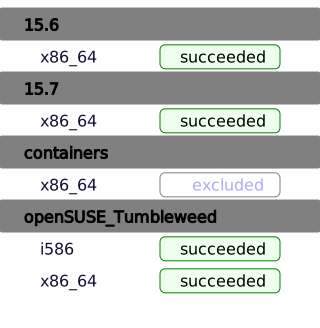
可视化构建结果
http://br.opensuse.org/ 创建构建结果的概述。
使用 https://br.opensuse.org/status/PRJ/PKG/<repo>/<arch>,其中 repo 和 arch 是可选的。
例如
- https://br.opensuse.org/status/devel:languages:lua/lua54
- https://br.opensuse.org/status/devel:languages:lua/lua54/openSUSE_Tumbleweed/aarch64
这可以添加到您的软件包 README.md
Devel project build status:
提示和最佳实践
提交消息和变更日志
当您更新软件包时,您可以重用在 .changes 文件中编写的文本作为 git 提交消息。为此,请遵循 此处 描述的标准格式,如下所示
-------------------------------------------------------------------
Sat Jan 11 16:37:07 UTC 2025 - Your Name <your@emailcom>

- Update to new upstream release x.y.z:
  * bling and changes from upstream for that version
  * just the relevant parts, no info about other OS
  * and keep it as short as possible

-------------------------------------------------------------------
Sat Jan 10 16:37:07 UTC 2025 - Your Name <your@emailcom>

- Initial package of packagename 1.0 for openSUSE:
您可以使用多种方法重用您的变更日志。
变更日志别名
使用以下行
git diff -U0 --cached *.changes | grep '^[+]' | grep -Ev '^(--- a/|\+\+\+ b/)' | tail -n +4 | cut -c4- | git commit -F -
将其作为别名添加到您的 shell
vi *.zshrc

alias gitum="git diff -U0 --cached *.changes | grep '^[+]' | grep -Ev '^(--- a/|\+\+\+ b/)' | tail -n +4 | cut -c4- | git commit -F -"
在您使用 git add *.spec *.changes *.tar.gz 将文件添加到要包含在下一个提交中的文件后,现在可以运行 gitum 以获取暂存的更改文件中的提交消息,删除样板,然后提交。
insteadOf
如果您厌倦了编写 src.opensuse.org,您可以使用 insteadOf 在您的 ~/.gitconfig 文件中。将此添加到配置
[url "gitea@src.opensuse.org:"]
  insteadOf = soo:
现在您可以简单地使用 git clone soo:user/repo。
sha256 仓库与 Gitea 客户端
大多数时候,您实际上并不想从头开始创建新的仓库,而是使用准备好的模板,为此您可以运行
tea repo ct --name appropriateName --template pool/new_package
(是的,模板的名称实际上是 pool/new_package)。
如果您真的需要创建一个全新的空白仓库,并且因为我们需要 SHA256 仓库,您可以运行(从版本 61.2.0 开始)
tea repo create --name appropriateName --object-format sha256
工具参考
本指南中使用的工具的快速概述
- git
- osc
- git-obs
- git-obs-hooks
- tea
- autogits:autogits_obs_staging_bot、autogits-devel 机器人的来源