Arm NN
Arm NN 是一个适用于 CPU、GPU 和 NPU 的推理引擎。它弥合了现有 NN 框架与底层 IP 之间的差距。它能够高效地转换现有的神经网络框架,例如 TensorFlow 和 Caffe,使其能够在 Arm Cortex-A CPU、GPU(Arm Mali 或任何 openCL 2.0)和 Arm Ethos NPU 上高效运行,无需修改。
更多信息请访问 https://developer.arm.com/ip-products/processors/machine-learning/arm-nn
安装
Arm NN 在 science:machinelearning OBS 项目中打包,并在 https://github.com/ARM-software/armnn 上开发。
您可以从以下位置安装 ARM-NN:
- Tumbleweed、Leap 15.2+ 和 PackageHub for SLE15 SP2+ 的 OSS 仓库
- https://software.opensuse.net.cn/package/armnn
当前状态
当前(2020-09-29)在 aarch64 Arm NN 上启用的选项
| Tumbleweed | Leap 15.2 | Leap 15.1(仅在 devel 项目中) | |
|---|---|---|---|
| NEON 支持 | |||
| openCL 支持(GPU)* | |||
| Caffe 支持 | |||
| ONNX 支持 | 与 onnx 1.7.0 不兼容 | (没有 python-onnx 包) | |
| TensorFlow 支持 | (TensorFlow 无法构建) | ||
| TensorFlowLite 支持 | (没有 flatbuffers 包) |


* openCL 支持(GPU)已在 openSUSE Tumbleweed 上使用 HiKey960 板进行测试,该板包含具有 openCL 2.x 支持的 Mali Bifrost G71。根据 [1] 和 [2],它需要具有 openCL 1.2 + cl_arm_non_uniform_work_group_size(为了获得更好的性能 openCL 2.0)的 GPU。上游测试在 Mali GPU 上进行。
已知问题
openCL 后端
- 如果您没有 /usr/lib64/libOpenCL.so 文件,则必须将其链接到 libOpenCL.so.1 文件
sudo ln -s /usr/lib64/libOpenCL.so.1 /usr/lib64/libOpenCL.so
- openCL 后端当前仅支持 GPU 类型设备。因此,您无法使用 CPU 或 ACCELERATOR 设备。
请参阅:https://github.com/ARM-software/armnn/issues/286
- 如果您收到以下错误
An error occurred when preparing the network workloads: in create_kernel src/core/CL/CLKernelLibrary.cpp:1087: Non uniform workgroup size is not supported!!
您使用的是没有 cl_arm_non_uniform_work_group_size 支持的 openCL 1.x,这对于 ArmNN openCL 是必需的。
工具
ExecuteNetwork
Arm NN 的 ExecuteNetwork 程序接收任何模型和任何输入张量,并仅打印输出张量。不带任何参数运行它以查看命令行帮助。
ArmnnConverter
ArmnnConverter 程序接收任何输入格式的模型,并生成 Arm NN 格式(*.armnn)的序列化模型。它允许在没有专门的解析器的情况下运行此模型,只需本机 Arm NN 格式即可。不带任何参数运行它以查看命令行帮助。请注意,此程序只能转换所有操作都受序列化工具 src/armnnSerializer 支持的模型。
ArmnnQuantizer
ArmnnQuantizer 程序接收一个 32 位浮点网络,并将其转换为量化的非对称 8 位或量化的对称 16 位网络。默认支持静态量化,但如果指定了原始输入张量的 CSV 文件,则可以启用动态量化。不带任何参数运行它以查看命令行帮助。
测试/示例
SimpleSample
运行 SimpleSample 并输入一个数字(此处为 458)
 Please enter a number:
 458
 Your number was 458
Caffe 后端
CaffeInception_BN-Armnn
CaffeInception_BN-Armnn 示例使用 Caffe 模型在 ARM-NN 上进行图像分类。您需要获取数据和模型,因此请下载
- https://raw.githubusercontent.com/pertusa/InceptionBN-21K-for-Caffe/master/deploy.prototxt 和 http://www.dlsi.ua.es/~pertusa/deep/Inception21k.caffemodel 到 models/ 文件夹。
- 将鲨鱼(大白鲨)的图像重命名为 shark.jpg 并放置到 data/ 文件夹中。
Arm NN 无法按原样使用此模型,因此需要进行转换
- 需要将批处理大小设置为 1(而不是 10)
- Arm NN 不支持所有 Caffe 语法,因此某些以前的神经网络模型文件需要更新到最新的 Caffe 语法
因此,您需要
- 将 deploy.prototxt 复制到 deploy_armnn.prototxt 并更新文件以将批处理大小设置为 1
 --- models/deploy.prototxt      2019-10-01 13:25:13.502886667 +0000
 +++ models/deploy_armnn.prototxt        2019-10-01 13:38:55.860972787 +0000
 @@ -3,7 +3,7 @@ layer {
 name: "data"
 type: "Input"
 top: "data"
 -  input_param { shape: { dim: 10 dim: 3 dim: 224 dim: 224 } }
 +  input_param { shape: { dim: 1 dim: 3 dim: 224 dim: 224 } }
 }
 layer {
- 然后运行 models/ 文件夹中的以下 convert.py 脚本(需要 python3-caffe)
 #!/usr/bin/python3
 import caffe
 net = caffe.Net('deploy.prototxt', 'Inception21k.caffemodel', caffe.TEST)
 new_net = caffe.Net('deploy_armnn.prototxt', 'Inception21k.caffemodel', caffe.TEST)
 new_net.save('Inception-BN-batchsize1.caffemodel')
现在,您可以运行 CaffeInception_BN-Armnn --data-dir=data --model-dir=models
 ArmNN v20190800
 = Prediction values for test #0
 Top(1) prediction is 3694 with value: 0.255735
 Top(2) prediction is 3197 with value: 0.0031263
 Top(3) prediction is 1081 with value: 0.000757725
 Top(4) prediction is 567 with value: 0.000526447
 Top(5) prediction is 559 with value: 9.72124e-05
 Total time for 1 test cases: 0.088 seconds
 Average time per test case: 88.260 ms
 Overall accuracy: 1.000
 Runtime::UnloadNetwork(): Unloaded network with ID: 0
CaffeResNet-Armnn
CaffeResNet-Armnn 示例使用 Caffe 模型在 ARM-NN 上进行图像分类。您需要获取数据和模型,因此请下载
- https://onedrive.live.com/?authkey=%21AAFW2-FVoxeVRck&cid=4006CBB8476FF777&id=4006CBB8476FF777%2117895&parId=4006CBB8476FF777%2117887&o=OneUp 并将其从 RestNet-50-model.caffemodel 重命名为 ResNet_50_ilsvrc15_model.caffemodel 并将其移动到 models/ 文件夹。
- https://raw.githubusercontent.com/ameroyer/PIC/d136e9ceded0ceb700898725405d8eb7bd273bbe/val_samples/ILSVRC2012_val_00000018.JPEG 到 data/ 文件夹
- 将鲨鱼(大白鲨)的图像重命名为 shark.jpg 并放置到 data/ 文件夹中。
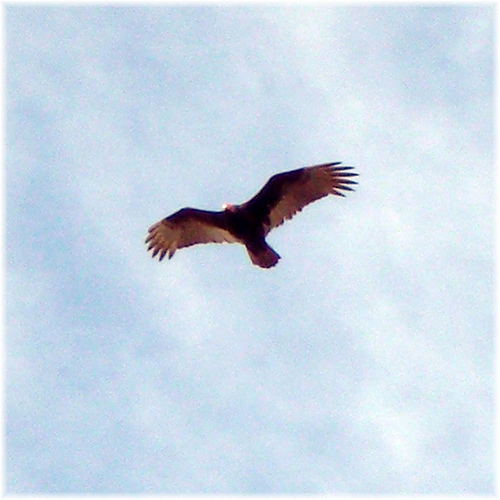
然后运行 CaffeResNet-Armnn --data-dir=data --model-dir=models
 ArmNN v20190800

 = Prediction values for test #0
 Top(1) prediction is 21 with value: 0.466987
 Top(2) prediction is 7 with value: 0.000633067
 Top(3) prediction is 1 with value: 2.17822e-06
 Top(4) prediction is 0 with value: 6.27832e-08
 = Prediction values for test #1
 Top(1) prediction is 2 with value: 0.511024
 Top(2) prediction is 0 with value: 2.7405e-07
 Total time for 2 test cases: 0.205 seconds
 Average time per test case: 102.741 ms
 Overall accuracy: 1.000
 Runtime::UnloadNetwork(): Unloaded network with ID: 0
CaffeMnist-Armnn
CaffeMnist-Armnn 示例使用 Caffe 模型在 ARM-NN 上进行手写数字识别。在此示例中,这是数字 7。
您需要获取数据和模型,因此请安装 arm-ml-example
由于 CaffeMnist-Armnn 需要略有不同的命名,因此您需要重命名文件
 cp -r /usr/share/armnn-mnist/* /tmp/
 mv /tmp/data/t10k-labels-idx1-ubyte /tmp/data/t10k-labels.idx1-ubyte
 mv /tmp/data/t10k-images-idx3-ubyte /tmp/data/t10k-images.idx3-ubyte
然后运行 CaffeMnist-Armnn --data-dir=/tmp/data/ --model-dir=/tmp/model/
 ArmNN v20190800

 = Prediction values for test #0
 Top(1) prediction is 7 with value: 1
 Top(2) prediction is 0 with value: 0
 = Prediction values for test #1
 Top(1) prediction is 2 with value: 1
 Top(2) prediction is 0 with value: 0
 = Prediction values for test #5
 Top(1) prediction is 1 with value: 1
 Top(2) prediction is 0 with value: 0
 = Prediction values for test #8
 Top(1) prediction is 5 with value: 1
 Top(2) prediction is 0 with value: 0
 = Prediction values for test #9
 Top(1) prediction is 9 with value: 1
 Top(2) prediction is 0 with value: 0
 Total time for 5 test cases: 0.008 seconds
 Average time per test case: 1.569 ms
 Overall accuracy: 1.000
 Runtime::UnloadNetwork(): Unloaded network with ID: 0
MNIST Caffe 示例
MNIST Caffe 示例使用 Caffe 模型在 ARM-NN 上进行手写数字识别。在此示例中,这是数字 7。
您必须安装 ARM ML 示例和相关数据
转到数据文件夹
cd /usr/share/armnn-mnist/
然后运行 mnist_caffe
 Predicted: 7
 Actual: 7
ONNX 后端
OnnxMnist-Armnn
OnnxMnist-Armnn 示例使用 ONNX 模型在 ARM-NN 上进行手写数字识别。在此示例中,这是数字 7。
您需要获取数据,因此请安装 arm-ml-example
并从 https://onnxzoo.blob.core.windows.net/models/opset_8/mnist/mnist.tar.gz 下载模型
由于 OnnxMnist-Armnn 需要略有不同的命名,因此您需要重命名文件
 cp -r /usr/share/armnn-mnist/* /tmp/
 mv /tmp/data/t10k-labels-idx1-ubyte /tmp/data/t10k-labels.idx1-ubyte
 mv /tmp/data/t10k-images-idx3-ubyte /tmp/data/t10k-images.idx3-ubyte
对于模型
 wget https://onnxzoo.blob.core.windows.net/models/opset_8/mnist/mnist.tar.gz
 tar xzf mnist.tar.gz
 cp mnist/model.onnx /tmp/model/mnist_onnx.onnx
然后运行 OnnxMnist-Armnn --data-dir=/tmp/data/ --model-dir=/tmp/model/ -i 1
 ArmNN v20190800
 = Prediction values for test #0
 Top(1) prediction is 7 with value: 28.34
 Top(2) prediction is 3 with value: 9.42895
 Top(3) prediction is 2 with value: 8.64272
 Top(4) prediction is 1 with value: 0.627583
 Top(5) prediction is 0 with value: -1.25672
 Total time for 1 test cases: 0.002 seconds
 Average time per test case: 2.278 ms
 Overall accuracy: 1.000
 Runtime::UnloadNetwork(): Unloaded network with ID: 0
OnnxMobileNet-Armnn
OnnxMobileNet-Armnn 示例使用 ONNX 模型在 ARM-NN 上进行图像分类。在此示例中,它将查找鲨鱼、狗和猫。
您需要获取 mobilenetv2 模型,因此
- 下载并解压缩 https://s3.amazonaws.com/onnx-model-zoo/mobilenet/mobilenetv2-1.0/mobilenetv2-1.0.tar.gz
- 将 mobilenetv2-1.0/mobilenetv2-1.0.onnx 复制到 models/ 文件夹
对于数据,您需要下载
- 将鲨鱼(大白鲨)的图像重命名为 shark.jpg 并放置到 data/ 文件夹中。
- 猫(虎斑猫)的图像,将其重命名为 Cat.jpg 并放置到 data/ 文件夹中。
- 狗(金毛寻回犬)的图像,将其重命名为 Dog.jpg 并放置到 data/ 文件夹中。
然后运行 OnnxMobileNet-Armnn --data-dir=data --model-dir=models -i 3
 ArmNN v20190800
 Performance test running in DEBUG build - results may be inaccurate.
 = Prediction values for test #0
 Top(1) prediction is 273 with value: 16.4625
 Top(2) prediction is 227 with value: 13.9884
 Top(3) prediction is 225 with value: 11.6609
 Top(4) prediction is 168 with value: 11.3706
 Top(5) prediction is 159 with value: 9.35255
 = Prediction values for test #1
 Top(1) prediction is 281 with value: 16.7145
 Top(2) prediction is 272 with value: 5.43621
 Top(3) prediction is 271 with value: 5.3766
 Top(4) prediction is 51 with value: 5.24998
 Top(5) prediction is 24 with value: 2.50436
 = Prediction values for test #2
 Top(1) prediction is 2 with value: 21.4471
 Top(2) prediction is 0 with value: 4.55977
 Total time for 3 test cases: 0.164 seconds
 Average time per test case: 54.651 ms
 Overall accuracy: 0.667
 Runtime::UnloadNetwork(): Unloaded network with ID: 0
TensorFlow 后端
TfInceptionV3-Armnn
TfInception_BN-Armnn 示例使用 TensorFlow 模型在 ARM-NN 上进行图像分类。您需要获取数据和模型,因此请下载
- https://storage.googleapis.com/download.tensorflow.org/models/inception_v3_2016_08_28_frozen.pb.tar.gz 并将其解压缩到 models/ 文件夹。
- 将鲨鱼(大白鲨)的图像重命名为 shark.jpg 并放置到 data/ 文件夹中。
- 猫(虎斑猫)的图像,将其重命名为 Cat.jpg 并放置到 data/ 文件夹中。
- 狗(金毛寻回犬)的图像,将其重命名为 Dog.jpg 并放置到 data/ 文件夹中。
现在,您可以运行 TfInceptionV3-Armnn --data-dir=data --model-dir=models
 ArmNN v20190800
= Prediction values for test #0
Top(1) prediction is 208 with value: 0.918417
Top(2) prediction is 206 with value: 0.000891919
Top(3) prediction is 176 with value: 0.000658453
Top(4) prediction is 155 with value: 0.000206609
Top(5) prediction is 92 with value: 0.000192534
= Prediction values for test #1
Top(1) prediction is 283 with value: 0.544097
Top(2) prediction is 282 with value: 0.321364
Top(3) prediction is 198 with value: 0.000288878
Top(4) prediction is 179 with value: 0.000153869
Top(5) prediction is 146 with value: 0.000141289
= Prediction values for test #2
Top(1) prediction is 3 with value: 0.826077
Top(2) prediction is 0 with value: 0.000125644
Total time for 3 test cases: 0.365 seconds
Average time per test case: 121.635 ms
Overall accuracy: 1.000
Runtime::UnloadNetwork(): Unloaded network with ID: 0
TfResNext-Armnn
TfResNext-Armnn 示例使用 TensorFlow 模型在 ARM-NN 上进行图像分类。您需要获取数据和模型,因此请下载
- http://download.tensorflow.org/models/mobilenet_v1_2018_08_02/mobilenet_v1_1.0_224.tgz 并将其解压缩到 models/ 文件夹
- 将鲨鱼(大白鲨)的图像重命名为 shark.jpg 并放置到 data/ 文件夹中。
- 猫(虎斑猫)的图像,将其重命名为 Cat.jpg 并放置到 data/ 文件夹中。
- 将金毛寻回犬的图像重命名为 Dog.jpg 并放置到 data/ 文件夹中。
然后运行 TfResNext-Armnn --data-dir=data --model-dir=models
ArmNN v20190800
= Prediction values for test #0
Top(1) prediction is 209 with value: 0.856742
Top(2) prediction is 208 with value: 0.0588841
Top(3) prediction is 167 with value: 0.00553092
Top(4) prediction is 160 with value: 0.000479352
Top(5) prediction is 102 with value: 0.000265176
= Prediction values for test #1
Top(1) prediction is 283 with value: 0.344484
Top(2) prediction is 282 with value: 0.0748539
Top(3) prediction is 52 with value: 0.00447383
Top(4) prediction is 25 with value: 0.000883748
Top(5) prediction is 6 with value: 5.20586e-05
= Prediction values for test #2
Top(1) prediction is 3 with value: 0.588796
Top(2) prediction is 2 with value: 0.000818478
Top(3) prediction is 1 with value: 4.20274e-06
Top(4) prediction is 0 with value: 4.55538e-10
Total time for 3 test cases: 0.060 seconds
Average time per test case: 19.954 ms
Overall accuracy: 1.000
Runtime::UnloadNetwork(): Unloaded network with ID: 0
TfMnist-Armnn
TfMnist-Armnn 示例使用 TensorFlow 模型在 ARM-NN 上进行手写数字识别。在此示例中,这是数字 7。
您需要获取数据和模型,因此请安装 arm-ml-example
由于 TfMnist-Armnn 需要略有不同的命名,因此您需要重命名文件
 cp -r /usr/share/armnn-mnist/* /tmp/
 mv /tmp/data/t10k-labels-idx1-ubyte /tmp/data/t10k-labels.idx1-ubyte
 mv /tmp/data/t10k-images-idx3-ubyte /tmp/data/t10k-images.idx3-ubyte
然后运行 TfMnist-Armnn --data-dir=/tmp/data/ --model-dir=/tmp/model/
ArmNN v20190800
= Prediction values for test #0
Top(1) prediction is 7 with value: 1
Top(2) prediction is 0 with value: 0
= Prediction values for test #1
Top(1) prediction is 2 with value: 1
Top(2) prediction is 0 with value: 0
= Prediction values for test #2
Top(1) prediction is 1 with value: 1
Top(2) prediction is 0 with value: 0
= Prediction values for test #3
Top(1) prediction is 0 with value: 1
= Prediction values for test #4
Top(1) prediction is 4 with value: 1
Top(2) prediction is 0 with value: 0
Total time for 5 test cases: 0.000 seconds
Average time per test case: 0.045 ms
Overall accuracy: 1.000
Runtime::UnloadNetwork(): Unloaded network with ID: 0
MNIST TensorFlow 示例
MNIST TensorFlow 示例使用 TensorFlow 模型在 ARM-NN 上进行手写数字识别。在此示例中,这是数字 7。
您必须安装 ARM ML 示例(和相关数据)
转到数据文件夹
cd /usr/share/armnn-mnist/
然后运行 mnist_tf
 Predicted: 7
 Actual: 7
mnist-draw - Web 应用
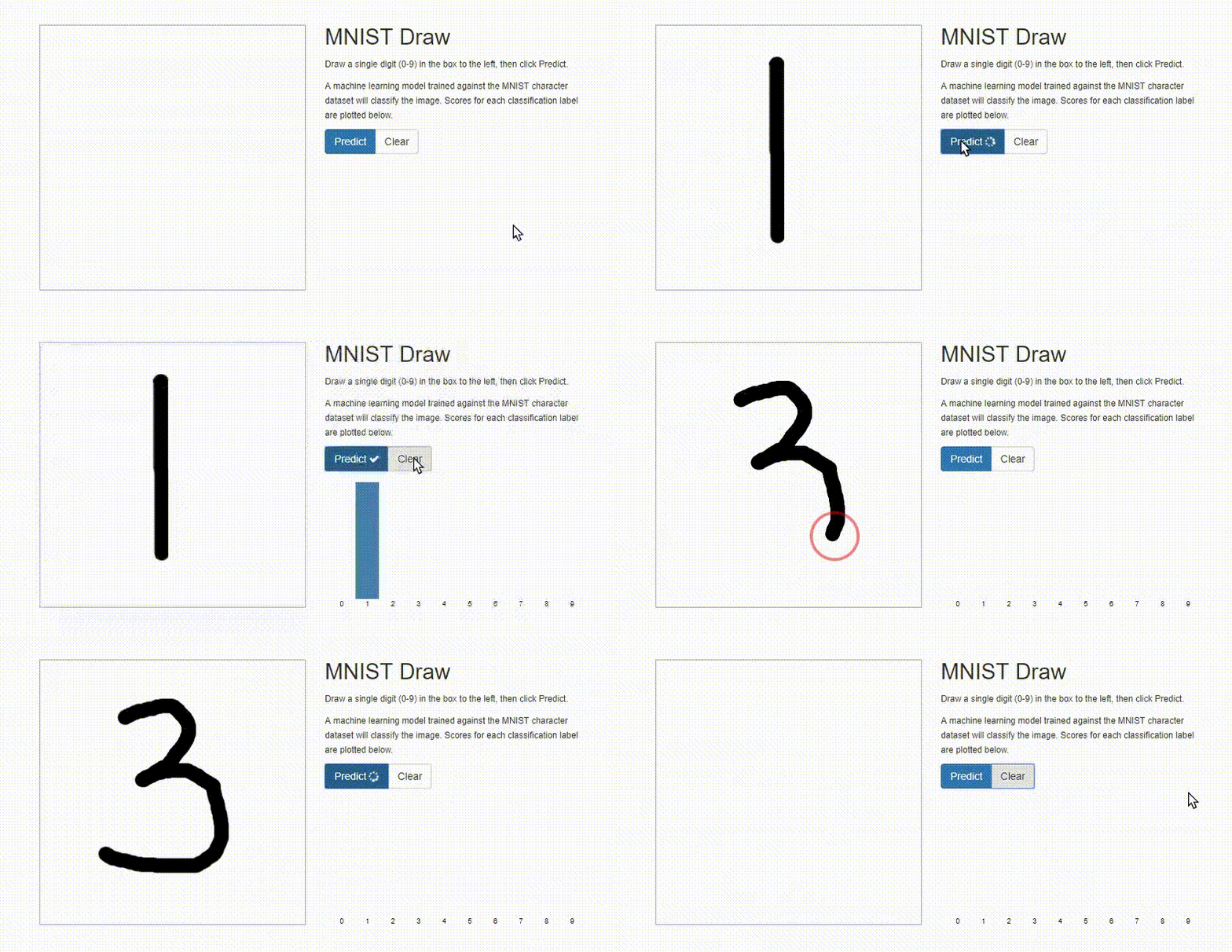
MNIST Draw 是一个单页网站,它允许用户手绘并使用机器学习对 0 到 9 之间的数字进行分类。使用针对 MNIST 数据集训练的机器学习模型进行分类。
该项目是 mnist-draw 的修改版本,它使用 Arm NN SDK 在 Arm Cortex-A CPU 上执行推理。该应用程序可以在任何 ARM 系统上运行,并通过浏览器通过网络访问。
目前还没有 RPM 包,因此您需要构建它并手动运行它。
安装依赖项
zypper in armnn-devel python3-Pillow python3-numpy gcc gcc-c++ make
从源代码编译
cd /tmp
git clone https://github.com/ARM-software/Tool-Solutions/
cd Tool-Solutions/ml-tool-examples/mnist-draw
make -C armnn-draw
chmod a+w . -R # Fix permissions
如果您想使用 GpuAcc 代替 CpuAcc,您可以更新 cgi-bin/mnist.py 通过将 mnist_tf_convol 参数从
completed = subprocess.run(['./armnn-draw/mnist_tf_convol', '1', '1', 'image.txt'], stderr=subprocess.PIPE, check=True)
到
completed = subprocess.run(['./armnn-draw/mnist_tf_convol', '2', '1', 'image.txt'], stderr=subprocess.PIPE, check=True)
运行它
python3 -m http.server --cgi 8080
并从您的网络浏览器访问它,例如:http://192.168.0.4:8080 如果您的板卡的 IP 地址为 192.168.0.4。
TensorFlow Lite 后端
要运行 TfLite*-Armnn 示例,您需要下载模型并将其解压缩到 models/ 文件夹
 # Only the *.tflite files are needed, but more files are in the archives
 wget http://download.tensorflow.org/models/tflite/mnasnet_1.3_224_09_07_2018.tgz
 tar xzf mnasnet_*.tgz
 mv mnasnet_*/ models
 pushd models
 wget http://download.tensorflow.org/models/tflite_11_05_08/inception_v3_quant.tgz
 tar xzf inception_v3_quant.tgz
 wget http://download.tensorflow.org/models/mobilenet_v1_2018_08_02/mobilenet_v1_1.0_224_quant.tgz
 tar xzf mobilenet_v1_1.0_224_quant.tgz
 wget http://download.tensorflow.org/models/tflite_11_05_08/mobilenet_v2_1.0_224_quant.tgz
 tar xzf mobilenet_v2_1.0_224_quant.tgz
 popd
您还可以从 MobileNet V1 存档中获取标签:https://storage.googleapis.com/download.tensorflow.org/models/tflite/mobilenet_v1_1.0_224_quant_and_labels.zip
对于数据,您需要下载
- 将鲨鱼(大白鲨)的图像重命名为 shark.jpg 并放置到 data/ 文件夹中。
- 猫(虎斑猫)的图像,将其重命名为 Cat.jpg 并放置到 data/ 文件夹中。
- 狗(金毛寻回犬)的图像,将其重命名为 Dog.jpg 并放置到 data/ 文件夹中。
TfLiteInceptionV3Quantized-Armnn 示例
准备好 models/ 和 data/ 文件夹后,您可以运行 TfLiteInceptionV3Quantized-Armnn --data-dir=data --model-dir=models
TfLiteMnasNet-Armnn 示例
准备好 models/ 和 data/ 文件夹后,您可以运行 TfLiteMnasNet-Armnn --data-dir=data --model-dir=models
TfLiteMobilenetQuantized-Armnn 示例
准备好 models/ 和 data/ 文件夹后,您可以运行 TfLiteMobilenetQuantized-Armnn --data-dir=data --model-dir=models
TfLiteMobilenetV2Quantized-Armnn 示例
准备好 models/ 和 data/ 文件夹后,您可以运行 TfLiteMobilenetV2Quantized-Armnn --data-dir=data --model-dir=models
附加(下游)测试
附加的下游测试单独打包在 armnn-extratests 包中。
TI ArmnnExamples
TI 提供了一个额外的测试 ArmnnExamples,它允许您在所有受支持的后端(Caffe、TensorFlow、TensorFlowLite、ONNX)上运行模型,使用 images、video(筛选 .mp4、.mov 和 .avi,但您可以更改扩展名以绕过筛选器并使用 .ogv 等)和来自网络摄像头的 live stream。更多信息请参见 http://software-dl.ti.com/processor-sdk-linux/esd/docs/latest/linux/Foundational_Components_ArmNN.html#arm-nn-mobilenet-demo
您需要下载一些文件(来自 tidl-api git 仓库的测试文件、mobilenet 模型和 mobilenet 标签)
git clone git://git.ti.com/tidl/tidl-api.git # Can be skipped if you want to use your own test files
wget http://download.tensorflow.org/models/mobilenet_v1_2018_08_02/mobilenet_v1_1.0_224.tgz
tar xzf *.tgz
wget https://raw.githubusercontent.com/leferrad/tensorflow-mobilenet/master/imagenet/labels.txt
sudo mkdir -p /usr/share/arm/armnn/models/
sudo cp labels.txt /usr/share/arm/armnn/models/
sudo chmod 666 /usr/share/arm/armnn/models/labels.txt # TO BE FIXED
使用 tidl-api/ 中的 baseball.jpg 进行测试
ArmnnExamples -f tensorflow-binary -i input -s '1 224 224 3' -o MobilenetV1/Predictions/Reshape_1 -d ./tidl-api/examples/classification/images/baseball.jpg -m ./mobilenet_v1_1.0_224_frozen.pb -c CpuAcc --number_frame 10
使用 tidl-api/ 中的 test2.mp4 视频片段进行测试,它显示视频,以及顶部匹配项和 FPS(需要安装 h.264 解码器)
ArmnnExamples -f tensorflow-binary -i input -s '1 224 224 3' -o MobilenetV1/Predictions/Reshape_1 -d ./tidl-api/examples/classification/clips/test2.mp4 -m ./mobilenet_v1_1.0_224_frozen.pb -c CpuAcc --number_frame 100
你也可以使用 warplane ogv 文件(只需将扩展名更改为 .mp4)
使用来自摄像机的实时流进行测试,它会显示视频,以及最佳匹配和 FPS(camera_live_input0 对应 /dev/video0,camera_live_input1 对应 /dev/video1,等等)
ArmnnExamples -f tensorflow-binary -i input -s '1 224 224 3' -o MobilenetV1/Predictions/Reshape_1 -d camera_live_input0 -m ./mobilenet_v1_1.0_224_frozen.pb -c CpuAcc --number_frame 100